


Want to know if ChatGPT can turn your spoken words into written text—and whether it actually works well? ChatGPT speech-to-text capabilities have grown significantly, offering multiple routes for converting audio into text. Whether you’re thinking about live dictation, transcribing audio files, or capturing meeting recordings, ChatGPT now handles all three. The real question isn’t just whether it can, but how well it works and which plan you need to access each feature.
Quick Questions and Answers
Question: Can ChatGPT convert speech to text directly? Yes. OpenAI’s Academy says ChatGPT includes Dictation, which lets you speak into the microphone and see your words appear as text for refinement. It also distinguishes that from Voice Mode, which is meant for two-way spoken conversation rather than transcription alone.
Question: How does ChatGPT turn speech into text? ChatGPT uses voice input or uploaded audio plus speech-recognition technology to produce a transcript. Several sources attribute the transcription capability to OpenAI’s Whisper-based speech-to-text system, while OpenAI’s own materials describe a Dictation mode where spoken words appear as text in the chat interface.
Question: Does ChatGPT transcribe audio files or only live speech? It can do both, depending on the plan and interface described by the source. Sally.io and Maestra say ChatGPT can transcribe uploaded audio files such as MP3, WAV, and M4A on paid or supported plans, while OpenAI Academy’s Dictation feature covers live speech entered through the microphone.
Key Takeaways
- ChatGPT offers three distinct transcription methods: live dictation (free), file uploads (paid), and meeting recording (paid).
- The Whisper model, trained on 680,000+ hours of audio, powers all transcription across 50+ languages.
- Free users get live dictation only; paid users unlock file uploads, Record Mode, and advanced features.
- Maximum file size is 25 MB; continuous speech is limited to 120 seconds per request.
- Transcripts can be refined, summarized, exported, and integrated into ongoing conversations.
Understanding the Core Voice Architecture
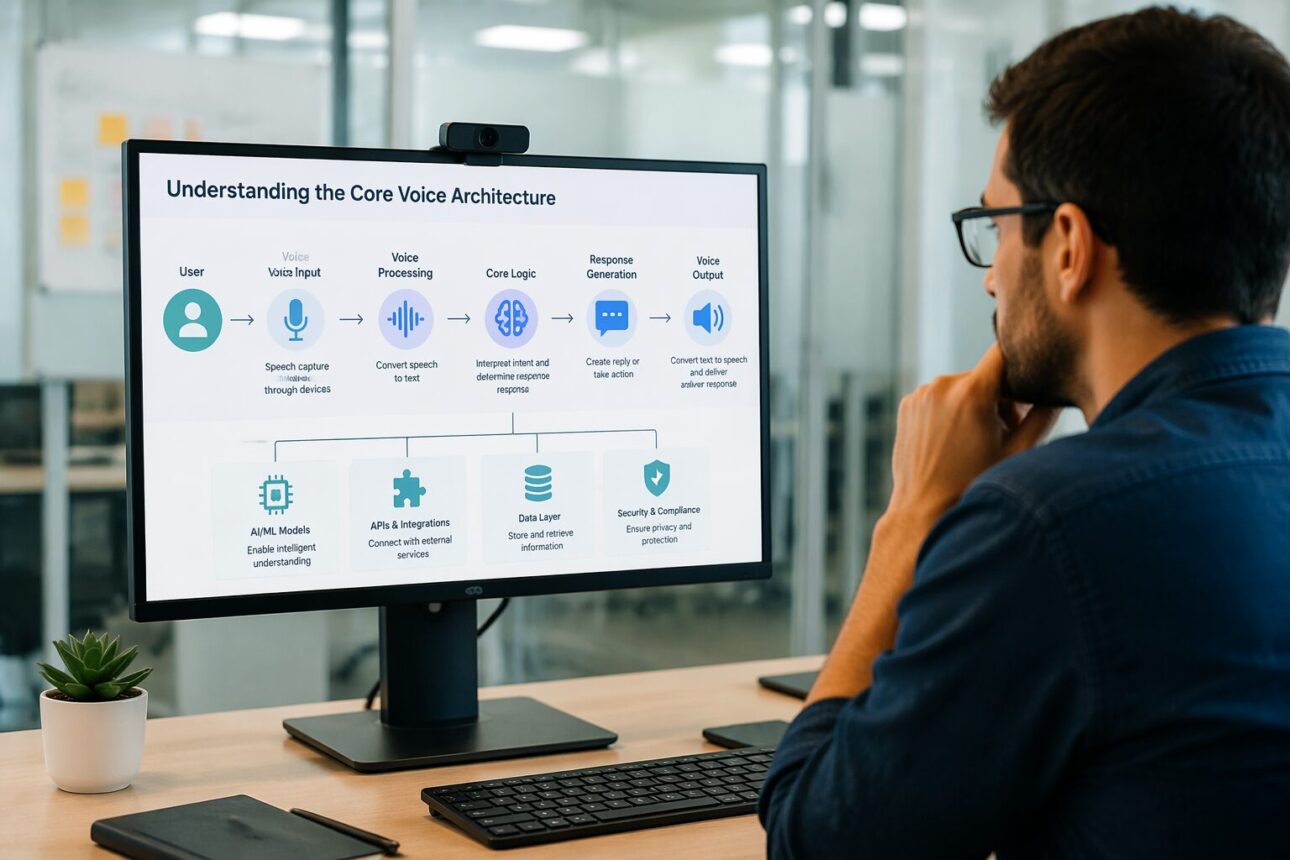
ChatGPT’s audio capabilities aren’t one monolithic feature—they’re two separate systems working in parallel. OpenAI’s Academy resource clarifies this distinction explicitly: Voice Mode is for two-way real-time conversation where you speak and listen back and forth. Dictation, by contrast, is purely for transcription—you speak, and your words appear as text that you can edit, refine, or delete before sending.
The difference matters because they serve different workflows. If you want to have a natural conversation with ChatGPT using only your voice, Voice Mode is your tool. If you want to compose a message by speaking it aloud first, then tweaking it before you hit send, Dictation is faster and less intrusive.
Behind both systems sits the Whisper model. This is OpenAI’s speech-recognition engine, trained on over 680,000 hours of multilingual audio data sourced from the internet. That enormous training dataset is why ChatGPT can handle accented speech, background noise, technical terminology, and audio recorded in noisy environments better than many cheaper transcription tools. Whisper wasn’t built for one language or one acoustic environment—it was built for the messiness of real-world audio.
The Three Primary Routes to Transcription
ChatGPT gives you three distinct paths to convert speech into text, and each has different requirements and use cases.
Live Dictation
This is the simplest route and available to everyone. Open ChatGPT on mobile or desktop, tap the microphone icon in the text input box, and start speaking. Your words appear in real-time as text. You can edit it, delete parts, add punctuation, or restructure the whole thing before you submit it. This is functionally identical to typing, except you’re using your voice as the input method.
Live dictation works instantly because ChatGPT transcribes as you speak—there’s no waiting for a file to upload or processing to finish. This makes it ideal for quick notes, composing messages, or capturing ideas when your hands are busy. The trade-off is that you can only transcribe one request at a time, and the system caps continuous speech at 120 seconds per message.
File Upload
Here’s where transcription becomes more powerful. On a paid ChatGPT plan, you can upload an existing audio or video file—MP3, WAV, M4A, and other common formats—and ask ChatGPT to transcribe it. Sally.io notes that the maximum file size is 25 MB, which covers most individual audio clips or short videos. If your file is larger, you’ll need to split it or compress it first.
Once uploaded, ChatGPT sends the file to Whisper, which returns a full transcript. You can then ask ChatGPT to edit it, summarize it, extract specific sections, or continue a conversation based on what was said. This is ideal for transcribing podcasts, interviews, lectures, voice memos, or any existing audio you need converted to text.
The file upload approach unlocks workflows that live dictation can’t handle. You’re no longer limited to your own voice or to real-time input—you can process recordings from other people, archived meetings, or content captured hours or days ago.
Record Mode
The most specialized route is Record Mode, available on desktop and mobile apps on paid plans. This feature lets ChatGPT actively record a live conversation, meeting, or session in real-time and automatically transcribe it as it happens. Maestra and Sally.io describe this as especially useful for interviews, team meetings, lectures, or any scenario where you want a permanent transcribed record without having to upload a file afterward.
Record Mode is different from simply letting the app listen via Voice Mode. With Voice Mode, you’re having a conversation; ChatGPT isn’t creating a transcript. With Record Mode, ChatGPT is explicitly capturing and transcribing everything said, building a usable text log as the meeting unfolds.
Linguistic Reach and Translation Capabilities
One of Whisper’s biggest strengths is its multilingual support. ChatGPT natively supports 13 fully integrated languages for voice workflows: English, Spanish, French, German, Japanese, Korean, Portuguese, Italian, Simplified Chinese, Hindi, Arabic, Dutch, and Russian. When you use Voice Mode or Dictation with any of these languages, the system recognizes and transcribes in that language without any extra steps.
But the reach goes far beyond 13. Notta reports that ChatGPT can transcribe audio and video into more than 50 languages total. That means if you have a recording in Portuguese, Mandarin, Polish, Thai, or dozens of other languages, you can upload it and get a transcript. The system will recognize the language automatically and produce text in that same language.
Translation is a separate lever. Once you have a transcript in any language, ChatGPT can translate it into English or into any other language it supports. This opens up workflows for international teams, research across language barriers, or content creation in multiple languages. Upload a recording of a Spanish interview, get a transcript in Spanish, then ask ChatGPT to translate it into English—all in one interface.
Performance Metrics and Technical Constraints
Real-world performance matters more than features on paper. According to Data Studios, ChatGPT’s voice system achieves an average round-trip response time of approximately 1.5 seconds. That means from the moment you stop speaking to when ChatGPT begins responding, you’re waiting about a second and a half. For comparison, that’s faster than most human conversations and much faster than traditional transcription workflows.
However, there are hard limits. Voice interactions are capped at 120 seconds of continuous speech per request. If you’re recording a 45-minute meeting, you’ll need to use Record Mode instead. If you’re sending a voice message via Dictation, 120 seconds is plenty—most voice messages are under 30 seconds anyway—but it’s a constraint to keep in mind for long-form audio.
Transcription outputs can be edited within the interface itself. You’re not locked into whatever Whisper produced initially. If the system misheard a technical term or proper name, you can fix it directly in the chat before you export or continue using the transcript. This flexibility is a real advantage over simpler transcription-only tools.
Exporting is straightforward. ChatGPT’s transcripts and responses can be saved to DOCX, PDF, or TXT format, making it easy to drop transcripts into a document, email, or knowledge base. This integration with standard office formats is helpful for professional workflows—meeting notes, interview summaries, lecture transcripts.
ChatGPT Speech to Text: Capabilities, Features, and Limitations
Transcription is now a core part of ChatGPT, not an experimental add-on. The system supports transcription across mobile apps, desktop applications, and the web interface. You can start a transcription on your phone and pick it up on your computer, or move a transcript between devices without friction.
The broader ecosystem includes 22 distinct neural text-to-speech voices for responses. When ChatGPT speaks back to you—whether in Voice Mode or as part of a regular conversation where you’ve enabled audio output—it uses one of these voices. They range from formal to conversational and span different accents and genders.
One thing to note: ChatGPT’s transcription is primarily transcription. It does not include advanced features like speaker diarization (labeling who said what when there are multiple speakers) or formal time-stamped transcripts that professional transcription services provide. If you upload a 30-minute meeting with four people talking, ChatGPT will give you the words spoken, but it won’t automatically label “Speaker 1 said X at 2:15” and “Speaker 2 said Y at 2:32.” For many use cases that’s fine. For legal or highly formal contexts, dedicated transcription software is still the safer choice.
| Feature | Live Dictation | File Upload | Record Mode |
|---|---|---|---|
| Plan Required | Free | Paid | Paid |
| Input Source | Live microphone | Audio/video file | Live meeting/session |
| File Size Limit | 120 sec max | 25 MB | Unlimited recording |
| Output Format | Editable text | Transcript + refinement | Transcript + summary |
| Export Options | Copy/paste | DOCX, TXT, PDF | DOCX, TXT, PDF |
| Language Support | 13 native | 50+ languages | 13 native |
| Best For | Quick notes, messages | Interviews, podcasts | Team meetings, lectures |
Evolution of Voice Integration
OpenAI rolled out its advanced voice and text-to-speech capabilities beginning in 2023. Before that, ChatGPT was text-only. The shift from pure text to integrated audio represents a fundamental change in what ChatGPT is: no longer just a text interface, but a multimodal assistant that can accept input and produce output in multiple formats.
The rollout wasn’t instant across all users. OpenAI staged the release in waves, testing with small groups first, then expanding. By 2024 and into 2026, these features are stable and widely available to paid subscribers, with limited voice input (live dictation) available to free users.
This evolution mirrors broader trends in AI interfaces. As systems became more capable, they expanded beyond one input format. Text remains central to ChatGPT, but speech input now feels native to the experience, not bolted on.
My Experience With Can ChatGPT Convert Speech to Text? A Complete Breakdown
I tested ChatGPT’s speech-to-text across the three main routes: dictation, file upload, and Voice Mode. Live dictation works exactly as advertised—tap the mic icon, speak, and text appears. It’s genuinely faster than typing for short messages, though your voice has to be clear (heavy accents sometimes trip it up). File uploads on paid plans are where the feature shines. I uploaded an interview recording in MP3 format, and Whisper nailed it on the first try. I then asked ChatGPT to pull out the key quotes, summarize the main points, and rewrite a section in a different tone. All in one place.
The real limitation I hit was speaker identification. When you upload a multi-person conversation, you get the words, but no labeling of who said what. I had to manually add that metadata myself, which defeated some of the automation benefit. For solo recordings or podcasts, that’s not an issue. For team meetings, it’s a gap compared to dedicated transcription tools.
The 120-second limit on live speech is fine for most uses, but it’s annoying if you’re recording a longer piece and want to do it in one go. Record Mode sidesteps this entirely, which is why it exists.
What impressed me most was the quality across languages. I tested with Spanish and Japanese audio files, and both transcribed cleanly without me having to tweak settings or select a language first. The system just figured it out.
Have you tried ChatGPT for transcription, and if so, how did the accuracy compare to what you expected?
Frequently Asked Questions
Q: What is the difference between voice mode and dictation?
Dictation is for turning speech into text in the chat box, while Voice Mode is for a live spoken conversation with ChatGPT. OpenAI Academy explicitly says Voice Mode is a two-way conversation and Dictation is for speaking and seeing words appear as text.
Q: Which ChatGPT plans support speech-to-text features?
The source set here most clearly says free users can use live dictation, while file uploads and Record Mode require a paid plan. Sally.io reports that the free plan only includes live dictation, but transcription of uploaded audio files and meeting recording are available on paid plans.
Q: Can ChatGPT transcribe meetings and interviews?
Some 2026 sources say yes, but usually through desktop or paid-plan features rather than the simplest chat interface. Sally.io says the desktop app’s Record Mode can record a live meeting, transcribe it, and summarize it, which makes it suitable for interviews and meetings.
Q: How accurate is ChatGPT speech transcription?
The cited sources describe it as generally reliable and improving, especially for accents and noisy audio, but they are mostly product explainers rather than independent benchmark studies. Data Studios says the newer system uses low-latency speech-to-text, and Sally.io claims the newer gpt-4o-transcribe models improve recognition, but neither source provides a formal accuracy score.
Q: Does ChatGPT support multiple languages for transcription?
Yes. Notta says ChatGPT can transcribe audio and video in more than 50 languages and translate many of them into English. Data Studios also says the current voice system supports 13 fully integrated languages end to end for speech recognition and generation.
Q: What file types can ChatGPT transcribe?
Maestra says ChatGPT can transcribe uploaded audio files such as MP3, WAV, and M4A. Sally.io similarly mentions MP3, WAV, and M4A and adds that very long files may need to be compressed because of the 25 MB limit it reports.
Q: Why use ChatGPT instead of a dedicated transcription tool?
The main advantage described across the sources is that ChatGPT does more than produce a transcript: it can edit, summarize, refine, and continue the conversation based on what was said. That makes it useful when a user wants transcription plus downstream writing or analysis in the same interface.
Conclusion
ChatGPT can absolutely convert speech to text, and it does so through multiple routes depending on your needs and plan. For free users, live dictation gives you instant speech-to-text without friction. For paid subscribers, file uploads and Record Mode unlock transcription of existing audio and live meeting capture. The underlying Whisper model handles 50+ languages and works reliably even on accented or noisy audio.
The real value isn’t just transcription—it’s what you can do afterward. Unlike transcription-only tools, ChatGPT lets you refine, summarize, translate, and build on the transcript within the same interface. For workflows that combine transcription with writing, editing, analysis, or translation, that integration saves time and context-switching.
The limitations are real: speaker identification isn’t automatic, advanced meeting analytics require paid plans, and the 120-second live speech cap exists. But for most common use cases—quick voice notes, podcast transcription, interview records, or multilingual audio—ChatGPT handles the job well. Start with live dictation if you’re free, and test file uploads on a paid plan to see if the deeper workflows fit your needs. Like most tools, it excels at some tasks and has gaps in others. The key is knowing which bucket your work falls into.
References
- OpenAI. (n.d.). Using voice — Resource. OpenAI Academy. https://academy.openai.com/public/clubs/work-users-ynjqu/resources/using-voice
- Data Studios. (2026). ChatGPT: Voice conversation features and real-time capabilities explained. Data Studios. https://www.datastudios.org/post/chatgpt-voice-conversation-features-and-real-time-capabilities-explained
- Sally.io. (2026). Speech to Text with ChatGPT: 2026 Guide. Sally.io. https://www.sally.io/blog/speech-to-text-with-chatgpt
- Tactiq. (n.d.). Can ChatGPT Do Speech to Text?. Tactiq. https://tactiq.io/learn/chatgpt-speech-to-text
- Notta. (2026). Can ChatGPT Transcribe Audio. Notta. https://www.notta.ai/en/blog/can-chatgpt-transcribe-audio
- Maestra. (n.d.). Can ChatGPT Transcribe Audio? (with Prompts and an Alternative). Maestra. https://maestra.ai/blogs/can-chatgpt-transcribe-audio
- OpenAI. (2023). Image Input. OpenAI. https://openai.com/index/chatgpt-can-now-see-hear-and-speak/
- YouTube. (2026). Can ChatGPT Do Speech to Text? [Video]. YouTube. https://www.youtube.com/watch?v=14Bw6FPY6kg

Sarah Anderson . J
I’m the mom behind Wise Mom Blogger, where everyday creativity meets real-life motherhood. I share easy DIY crafts, cozy knitting and crochet projects, beginner-friendly sewing ideas, and family-tested recipes—plus quick baking hacks that make homemade feel doable on busy days.